Take a Work Item Through Testing
One feature from acceptance criteria to sign-off — the standard ordering, then the same feature under test-driven ordering, and what actually differs.
This tutorial follows a single work item all the way through Fabric's testing loop: criteria in, cases drafted, cases run, verdict out, sign-off.
It runs the same feature twice — once with the project's default standard ordering, once with TDD ordering — because the difference between them is the part people most often get wrong.
Time: about 20 minutes for the first pass.
Before you start
You need:
- A project with at least one feature that has acceptance criteria written in its specification. Everything on the Testing tab is measured against criteria; a feature without them can produce nothing.
- Test-case generation left on for the project (a project ▸ Settings ▸ Testing ▸ Generation). It is on by default.
You do not need a CI connection to finish this tutorial. Where a step depends on one, it says so.
Part 1 — Standard ordering
This is the default: the feature is reviewed first, and cases are drafted afterwards from the reviewed criteria.
Open the feature's Testing tab
Open the feature, then its Testing tab.
On a feature nothing has run against yet, the verdict card reads Nothing to test against yet if no criteria have been parsed, or lists No QA analysis has been generated for this feature yet if they have.
Both are honest empty states rather than a green tick. Fabric will not report a feature as ready when it has no evidence either way.
Generate the analysis
Click Generate QA analysis.
Fabric reads the current specification and produces three things: the coverage ring, the traceability matrix, and the under-specified criteria list.
Read the warnings list first, before anything else on the page. A criterion flagged as too ambiguous to test reliably will produce cases that pass while the requirement goes unmet — and at this point it still costs one edit to fix. Clarify those criteria in the Full Specification and generate again.
Draft cases for the gaps
The verdict card offers Draft cases for the N gaps when criteria have no case covering them — click it. (The standalone Draft test cases with AI button below the card does the same thing without naming a count.)
Drafted cases arrive in the Proposed state. They are not part of your suite yet — a person accepts or rejects each one. This is deliberate: a suite that grew on its own is a suite nobody trusts.
How far each drafted case goes is set by the project's depth — Light, Standard or Enterprise. See Testing settings.
Accept what is worth keeping
Go to the project's Testing tab, Cases segment, and filter to Proposed.
Read them. Accept the ones that describe something worth verifying; reject the rest. Rejecting is a normal outcome, not a failure of the drafting — the point of Proposed is that the decision is yours.
Accepted cases move to Draft, then to Ready when they are complete enough to run.
Run them
Two ways, and they write to the same place:
- Your CI runs them. Connect a pipeline source and Fabric reads what Azure DevOps, GitHub Actions or GitLab reported, matching each automated test to the case it verifies. See CI test results.
- Fabric runs one itself, driving a real browser through the case's steps against one of your environments.
Either way the case's result updates. Remember that result and state are different axes: a Ready case that has never run is normal, and not run is not a pass.
Read the verdict
Back on the feature's Testing tab, the verdict now reflects the runs.
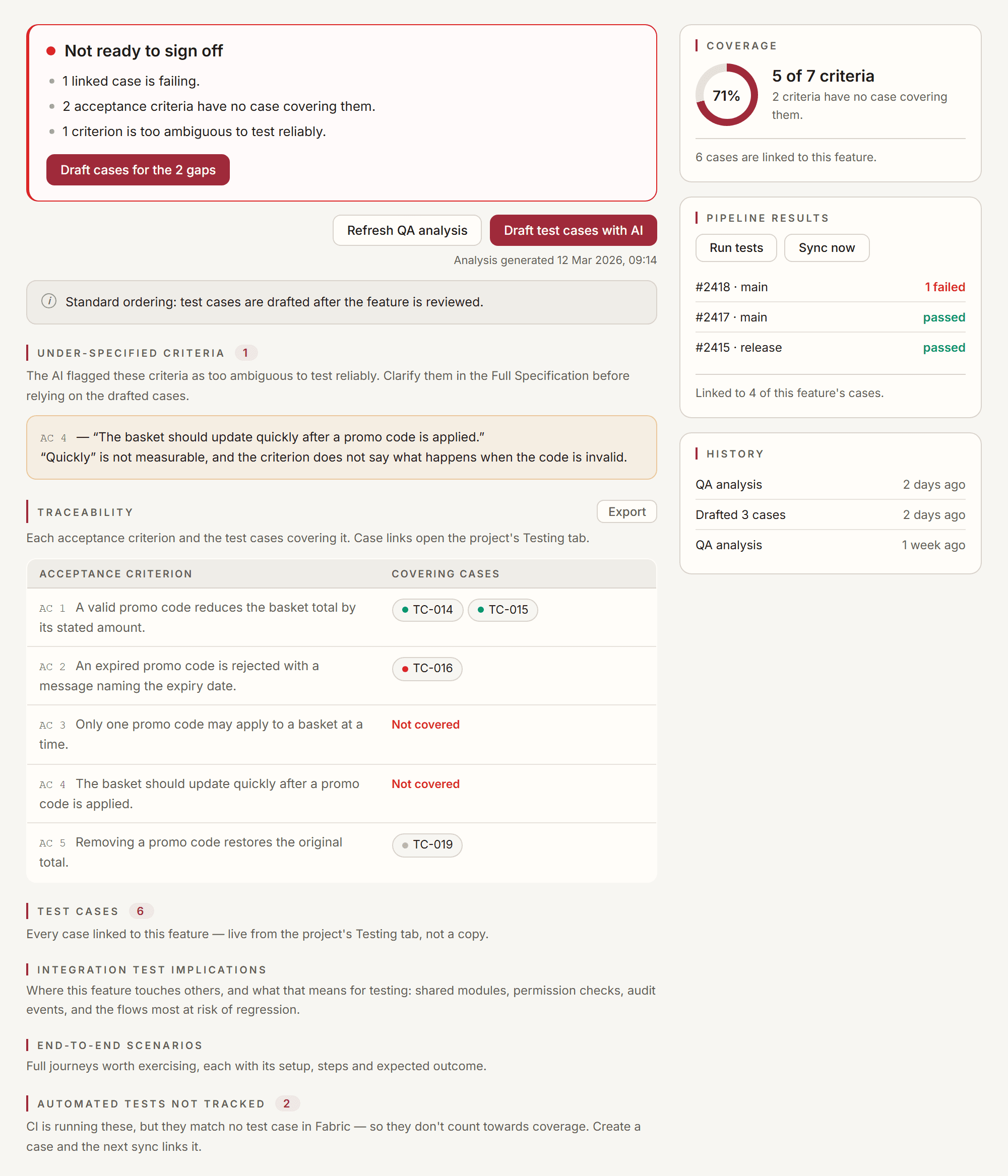
If it says Not ready to sign off, it names why — a failing case, or a criterion still uncovered. If it says Signable, with caveats, nothing is failing or uncovered but something is imperfect: usually ambiguous criteria, or an analysis that predates the current spec.
If the specification changed after you generated the QA analysis, the tab says so and the verdict keeps flagging it. Refresh it — a clean-looking page describing a specification that no longer exists is exactly the trap the staleness flag exists to prevent.
Sign off
If your project requires approvals, record them in the sign-off section at the bottom of the tab, beside the evidence they are about.
If the project requires none, this section does not appear.
Part 2 — The same feature, test-driven
Now turn on Apply TDD approach in a project ▸ Settings ▸ Testing ▸ Generation, and take a fresh feature through the same loop.
What changes
The order. Cases are drafted from the acceptance criteria before implementation, and reviewed before any code is written. The feature's Testing tab says which ordering is in force, so you never have to remember what the project is set to.
What the feature review is allowed to read. This is the substantive half, and it is invisible in the UI.
Under TDD ordering the feature review also reads the drafted cases, and asks three questions of the specification against them:
- does any case contradict the specification?
- does any case assume something the specification never promises?
- is there a criterion no case covers?
Under standard ordering the review deliberately does not see the cases. It cannot: they do not exist yet. Feeding a model its own later output back as evidence would have it grade its own work — so the clause is omitted rather than faked.
TDD ordering is a preference about sequence, not a gate. Nothing blocks you from implementing before the cases are reviewed. What changes is when Fabric drafts, and what the review may use as evidence.
Which to choose
Standard suits work where the specification is settled and the value of cases is regression protection.
TDD suits work where the specification is the risky part. Having cases first turns vague criteria into concrete, checkable statements before anyone builds against them — and the three questions above will surface a contradiction between spec and cases while it is still cheap to resolve.
You can change the setting at any time; it affects what is drafted next, not what already exists.
What you should have now
- A feature whose acceptance criteria are each covered by at least one case, or a verdict that names exactly which are not
- Cases you chose to keep, in Ready, with real results against them
- A verdict you can defend, because it lists its own reasons
- A clear sense of which ordering fits which kind of work