Overview
How Fabric's testing feature fits together — where cases come from, where results come from, what reads them, and which settings change any of it.
Testing in Fabric runs as a loop across several screens. A feature's acceptance criteria produce test cases; the cases are run — by your CI, or by Fabric driving a browser — and produce results; the results feed a verdict on whether that feature is ready to sign off; and the gaps feed back into what gets drafted next.
Each part has its own page, linked below.
Where things live
There are two places testing appears, and they answer different questions.
| Question it answers | Where | |
|---|---|---|
| The project's Testing tab | "What is the state of the whole suite?" | A project ▸ Testing |
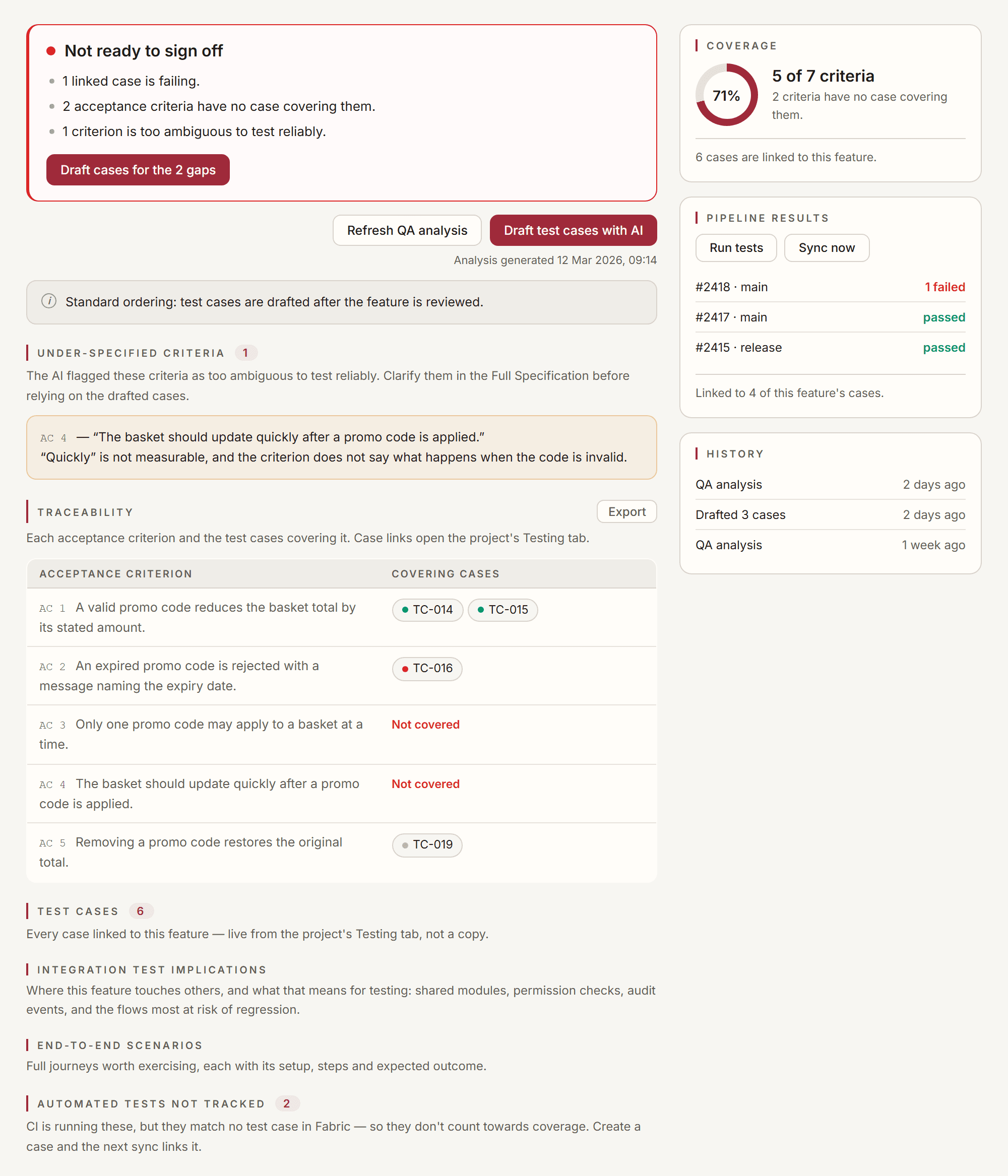
| A feature's Testing tab | "Is this feature ready to sign off?" | A feature ▸ Testing |
The project tab covers the suite as a whole. The feature tab shows the same cases filtered to what verifies one piece of work, plus the verdict that follows from them, so neither summarises the other.
Settings that change how either behaves are in one place: a project ▸ Settings ▸ Testing.
The loop
Criteria become cases
A feature's acceptance criteria are the input. Fabric drafts cases from them — on request from the feature's Testing tab, or automatically, depending on the project. Drafted cases arrive as Proposed and wait for a person; they never join the suite unasked.
Whether drafting happens before implementation or after review is the project's TDD setting, and it changes more than the order — see Test-driven and standard ordering below.
Cases are run
Two independent sources, one history:
- Your CI reports what it ran. Fabric reads Azure DevOps, GitHub Actions and GitLab CI, and links each automated test back to the case it verifies.
- Fabric runs a case itself, driving a real browser through its steps against one of your environments.
Both appear on the Runs segment, and both write to the same per-case result.
Results become a verdict
On a feature's Testing tab, the traceability matrix, the warnings, the linked cases and the CI runs are four inputs to one question. The verdict card answers it directly — blocked, caution, ready, or unknown — and says which of those inputs drove the answer.
Gaps feed back
The Coverage segment reads the gap from the work rather than from the suite: which features and bugs have no case at all. Its count is what is still uncovered, not the total — a number that only goes down as you close gaps.
Test-driven and standard ordering
Apply TDD approach (a project ▸ Settings ▸ Testing ▸ Generation, off by default) changes two things, not one.
Standard ordering (default). The feature is reviewed first; test cases are drafted afterwards, from the reviewed criteria.
TDD ordering. Cases are drafted from the acceptance criteria before implementation, and reviewed before any code is written. The feature review then also reads the drafted cases and asks three questions of the specification against them:
- does any case contradict the specification?
- does any case assume something the specification never promises?
- is there a criterion no case covers?
Under standard ordering the review deliberately does not see the cases — they do not exist yet, and feeding a model its own later output back as evidence grades its work against itself. Under TDD the cases exist first, so they are independent evidence and the review can use them.
TDD ordering is a preference about sequence, not a lifecycle gate. Nothing is blocked if you implement before the cases are reviewed; the ordering changes what Fabric drafts when, and what the feature review is allowed to read.
What a case carries
Each case has a TC-NNN identifier scoped to the project, ordered Action + Expected steps, an owner, tags, and two independent dimensions people routinely conflate:
- State — where the case is in its own life: Proposed → Draft → Ready → Closed. This is about the case.
- Result — the most recent verdict recorded against it: passed, failed, blocked, or not run. This is about the last run.
A Ready case that has never run is normal. Not run is not a pass — it means nothing has been proven about the case yet, and it is counted separately everywhere in the product for exactly that reason.
Blocked is a third thing again: the run could not reach a verdict — a broken environment, missing data, a dependency that never came up. Blocked is not failed; nothing has been proven either way.
Where to go next
Cases
Author cases with ordered steps, filter and share views, draft with AI, sync to your PM tool
A feature's Testing tab
Coverage, traceability, the readiness verdict, and sign-off for one feature
CI test results
Pull automated results from Azure DevOps, GitHub Actions or GitLab and link them to cases
Pull requests
What Fabric looks for when it reads a diff, and which lenses apply
Testing settings
Depth, coverage targets, environments, devices, evidence, CI sync and sceptic roles
Tutorial: take a work item through testing
One work item end to end, both with TDD ordering and without
Project Management Sync
Connect a project to Azure DevOps, GitLab, Jira, or Fizzy and push/pull your backlog as features and work items.
Test Cases
Author test cases with ordered steps, sync them to your PM tool, group them into plans, link them to the work they verify, and let the project AI use them as context.